 Pepe
How to install a modpack on a Minecraft server
A modpack is a ready-made set of mods and settings, such as Create+ or Cobblemon. In the panel you can install one without uploading any files yourself.
Step-by-step guides for popular modpacks: Cobblemon, Create, All The Mods, RLCraft.
Installation
- Make a backup. Installing a modpack replaces server files.
- Open the Modpacks tab.
- Type the name of the modpack in Search by name.
- Click Install next to it and wait until the installation finishes.
- Start the server. The first start of a big modpack can take a few minutes.
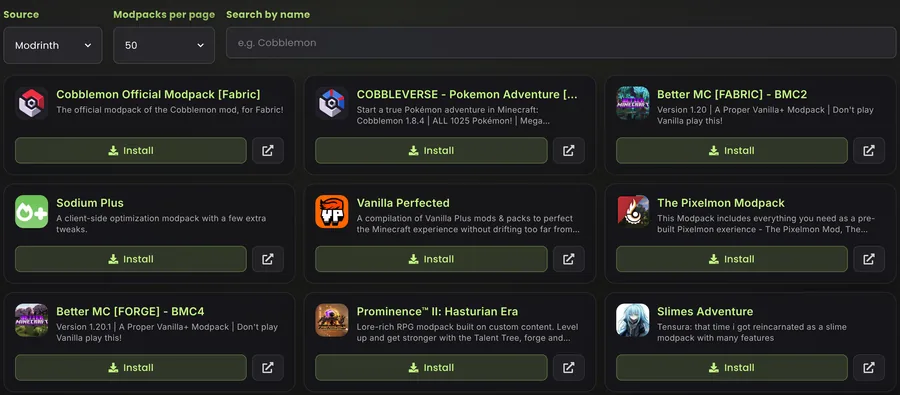
The arrow icon next to the button opens the modpack's page, where you can read the description and the recommended amount of RAM.
What kind of server a modpack needs
For modpacks the CPU matters most, and more precisely its clock speed. Minecraft runs almost all of the gameplay on a single core: mobs, machines, crops, world generation. Every mod adds its own work, and the server has to finish all of it within 1/20 of a second. When the CPU cannot keep up, TPS drops and everyone feels lag, even with plenty of RAM.
That is why the speed of one core matters more than the number of cores.
| Modpack | Examples | What to choose |
|---|---|---|
| Light, a few to a dozen mods | Fabric with performance mods, small add-ons | BASIC is enough |
| Medium | Cobblemon, Create, RLCraft | Premium with Ryzen 7 9700X |
| Heavy, 200+ mods | All The Mods, big tech packs | Premium with Ryzen 9 9950X |
Premium servers run on AMD Ryzen 9 9950X (up to 5.7 GHz) and Ryzen 7 9700X (up to 5.5 GHz) CPUs, with DDR5 memory and NVMe drives. They are among the fastest CPUs available for single-core work, which is exactly what a modded server needs. Fast drives also shorten the first start of the modpack and world loading.
To see how much memory a particular modpack needs, read how much RAM a Minecraft server needs.
How players join
Every player needs the same modpack in the same version as the server. The easiest way is a launcher that supports modpacks, such as Modrinth App, CurseForge or Prism Launcher. The player starts the game from that modpack and adds the server as usual.
Frequently asked questions
I have a BASIC server and the modpack lags. Do I need a new server?
No. You can move the server to Premium in the Settings tab, together with the world and files. You only pay the difference for the remaining days (how it works).
The modpack server will not start.
Most often it is short on memory or the modpack needs a different Java version. Check the first error in the console and the guide on a server that will not start.
Can I add my own mods to a modpack?
Yes, upload them to the mods folder. Every player needs the same mod too.
How do I go back to a normal server?
Restore the backup from before the installation, or change the software in the Server software tab and delete the mods folder.