 Pepe
How to give OP on a Minecraft server
An operator (OP) is a player who can use admin commands such as /gamemode, /tp, /ban or /time set. The easiest way to give OP is from the panel console, because the console does not need any permissions.
How to give OP from the panel console
- Log in to the PepeHost panel and pick your server.
- Make sure the server is running. The player does not have to be online.
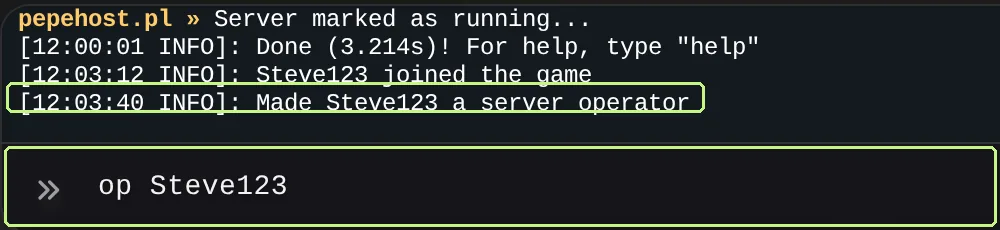
- In the Console tab, type the command at the bottom and press Enter:
op NickReplace Nick with the exact player name. In the console you type commands without the slash /.
If it worked, the console prints Made Nick a server operator. The player gets the permissions straight away, no restart needed.
How to give OP in game
Once you are an operator, you can OP others from the chat:
/op NickA player without OP is told they do not have permission to use the command. That is why the first operator always has to be added from the console.
How to remove OP
Type deop Nick in the console, or /deop Nick in game. It takes effect immediately.
Where the server keeps the list of operators
The list lives in ops.json in the main server folder (the Files tab). You do not need to edit it, because op and deop update it for you. If you do change it by hand, restart the server so it reads the new list.
OP permission levels
By default an operator gets level 4, which is full access, including /stop and /op. You can change the level with op-permission-level in server.properties:
1- can build inside spawn protection,2- map maker commands, such as/gamemode,/tpand/give,3- player management:/kick,/ban,/op,4- everything, including/stop.
OP for a Bedrock player
If phone and console players join through GeyserMC, their names on the server start with a dot and spaces become underscores. A Bedrock player called Steve Smith is .Steve_Smith on the server, so you type:
op .Steve_SmithType list while the player is online to see the exact name.
OP or a permissions plugin
OP is all or nothing. That is fine on a server for friends. Once you have moderators, give them only the commands they need with a permissions plugin such as LuckPerms. A moderator with full OP can stop the server by accident, spawn items or even take your OP away.
| OP | LuckPerms | |
|---|---|---|
| Setup | one command | groups and permissions |
| Scope | every command at that level | only the commands you pick |
| Good for | the owner, trusted friends | moderators, player ranks |
Common messages
Made Nick a server operator- done.Nothing changed. The player already is an operator- the player already has OP.That player does not exist- a typo in the name or, on an online-mode server, no Minecraft account with that name.Unknown or incomplete command(in game) - you are not an operator yourself. Use the panel console instead.
For things you can do as an operator, see the list of admin commands.
Frequently asked questions
I type op and nothing happens.
Check that the server is running and that the name has no typo. In the console, leave out the slash. On an offline-mode server, if the player changed their name, OP the new name.
Does the player have to be online to get OP?
No. A correct name is enough. On an online-mode server (online-mode=true) the name has to belong to a real Minecraft account.
How do I OP myself as the server owner?
The same way as anyone else: type op YourName in the panel console. The console is the one place where you do not need permissions first.
My server is in offline mode. Is OP safe?
Only with a login plugin. Without one, anyone can join with your name and use your OP. Install a login plugin, register your name and only then OP yourself. More in the guide on offline mode servers.
I lost OP after changing online-mode. Why?
The server stores OP by UUID, and the UUID changes when you switch online-mode. Just OP yourself again.