 Pepe
How to connect to your Minecraft server with SFTP
SFTP is the easiest way to upload many files at once or something big, such as a world, a modpack or a backup. For small files the Files tab in the panel is enough.
Where to find your SFTP details
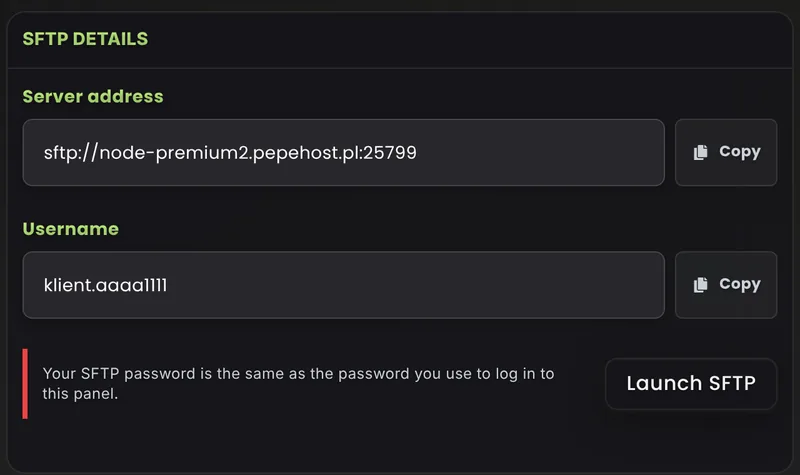
Open your server in the panel and go to the Settings tab. The SFTP details box shows:
- Server address, for example
sftp://node-premium2.pepehost.pl:25799. The part before the colon is the host, the number after it is the port. - Username, for example
name.a1b2c3d4. - Password: the same password you use to log in to the panel.
Connecting with WinSCP (Windows)
- Download WinSCP from the official website and install it.
- Set File protocol to SFTP.
- In Host name enter the address without
sftp://and without the port, for examplenode-premium2.pepehost.pl. - In Port number enter the port from the panel, for example
25799. - Enter your username and panel password, then click Login.
- The first time, WinSCP asks about the server's host key. Click Yes or Accept.
Your server files appear on the right. Drag files from the left side to the right to upload them.
Connecting with FileZilla (Windows, Mac, Linux)
- Download FileZilla Client from the official website.
- Go to File > Site Manager and click New site.
- Set Protocol to SFTP - SSH File Transfer Protocol.
- Enter the host and port from the panel and set Logon Type to Normal.
- Enter your username and panel password, then click Connect.
The "Launch SFTP" button
The same box has a Launch SFTP button. It opens the connection in the program your computer uses for sftp:// links, such as WinSCP. You still type the password in that program.
Frequently asked questions
I get a login error or "Access denied". What should I check?
Make sure the username includes the dot and the server ID, for example name.a1b2c3d4, and that you use your panel password. If you changed the panel password recently, use the new one.
Can I connect with plain FTP?
No, only SFTP. It is encrypted, so your password and files are not sent as plain text.
Can I edit files while the server is running?
You can, but it is better to change config files with the server stopped. The server rewrites some files when it shuts down, so your change could be lost.
How do I upload a world with SFTP?
Stop the server, delete the old world folder and upload your world folder in its place. It must have a level.dat file directly inside. Then start the server. More in how to upload a world.