 Pepe
How to back up and restore a Minecraft server
A backup is a copy of all your server files: the world, plugins and settings. Make one before every bigger change, such as a version update or installing a modpack.
How to make a backup
- In the panel open the Backups tab.
- Click Create backup.
- Give it a name, for example "Before plugin update", and confirm.
The backup is made in the background. A big world can take a few minutes. Next to the button you can see how many backups you have and how many your plan allows.
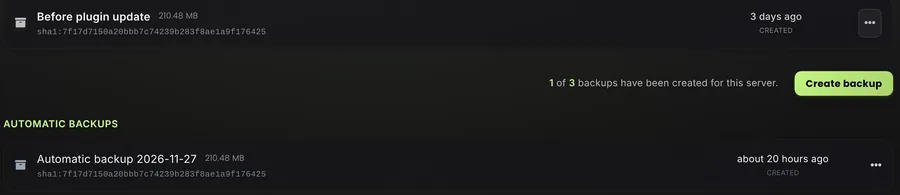
Automatic backups
Under Automatic backups you will find backups the panel makes on its own. You restore and download them the same way as the ones you make yourself.
Automatic backups are made every day and stored on a separate server. They do not use the disk space of your plan and do not count towards the number of backups you can make. In the panel you can restore an automatic backup from the last 24 hours. If you might need an older state, make your own backups before bigger changes.
How to restore a backup
- Click the three dots next to the backup.
- Choose Restore and confirm.
Restoring overwrites the current files with the version from the backup. Everything that changed on the server after the backup was made is gone. To bring back only one world or file, see how to restore a backup.
Downloading a backup to your computer
Under the same three dots there is a Download option. You get an archive with your server files that you can keep on your own computer. To open the world in singleplayer, see how to download your server world.
Frequently asked questions
Do backups use the server's disk space?
Automatic backups do not. They are kept on a separate server and do not count towards your plan's disk space.
I have reached the maximum number of backups.
Delete the oldest one, or download it to your computer first. You can also Lock a backup you never want to delete by accident.
Does the server have to be stopped for a backup?
No, but on a busy server it is safer to stop it first. Then no world file changes while the backup is being made.
Does a backup include MySQL databases?
No, a backup covers the server files. If you keep important plugin data in a database, export it separately in the Databases tab (how).