 Pepe
How to upgrade or downgrade your Minecraft server plan
You can change your plan yourself in the server's Settings tab. You do not need a new server: the world, plugins and files stay.
What you can change
| Change | Example | Where in the panel |
|---|---|---|
| Upgrade within the same range | BASIC STARTER to BASIC STANDARD or BASIC DEV | Upgrade plan |
| Downgrade within the same range | BASIC ADVANCED to BASIC DEV | Downgrade plan |
| Move from BASIC to PREMIUM | BASIC to PREMIUM with a Ryzen 7 9700X or Ryzen 9 9950X | Switch to PREMIUM |
| Upgrade PREMIUM to a faster CPU | PREMIUM Ryzen 7 9700X to PREMIUM Ryzen 9 9950X | Upgrade plan |
You pay for everything from your account balance. An upgrade does not change the server's expiry date.
Upgrading your plan
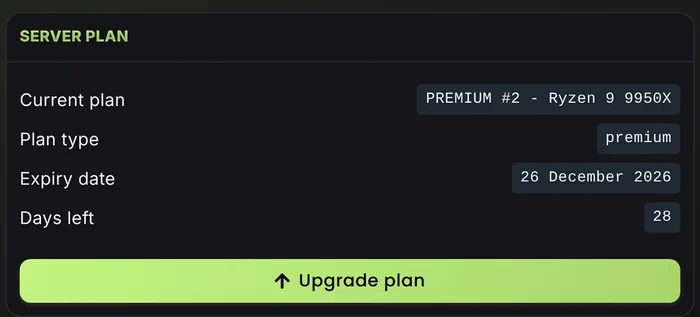
- In the Server plan box click Upgrade plan.
- Choose the new plan. You will see the specs side by side and the cost.
- Confirm.
The change works straight away. Sometimes the server needs a restart to use the extra memory.
What it costs: you only pay the price difference for the days left until the server expires.
Downgrading your plan
If your server needs less, click Downgrade plan in the same box and choose a cheaper plan from the same range.
You do not get money back. Instead, the panel converts the days you have left according to the price of the new plan and adds days to your server.
Before you downgrade, check that your server fits in the smaller plan, for example that it has enough RAM (how much RAM you need).
Moving from BASIC to PREMIUM
PREMIUM means faster AMD Ryzen CPUs. You can choose the Ryzen 9 9950X or the cheaper Ryzen 7 9700X.
- In the Switch to PREMIUM box click Choose a plan.
- Choose the CPU and the plan. You will see a comparison with your current server and the extra cost.
- Confirm.
The extra cost is calculated the same way as for an upgrade: the price difference for the days left. The expiry date does not change.
What happens to the server:
- it is moved to a PREMIUM machine together with all files,
- the move takes a few minutes, depending on the size of your files, and the server is offline during that time,
- after the move the IP address and port change. Give players the new address, or use a free subdomain so they do not notice anything,
- if the move fails, the extra cost goes back to your balance.
Frequently asked questions
Which plan should I choose?
See how much RAM you need. If your server lags, check the optimization guide first. Often a bigger plan is not needed.
Can I downgrade from PREMIUM to BASIC?
Not in the panel. You can only downgrade within the same range, for example from BASIC ADVANCED to BASIC DEV.
I do not see the Upgrade plan button.
You already have the biggest plan in your range, or the higher plans are sold out for now. From BASIC you can then switch to PREMIUM. If you have a package of several servers, message us on Discord, because you cannot change that kind of package yourself.
Will I lose my world or plugins?
No. Your files stay with every change. Still, make a backup before switching to PREMIUM.