 Pepe
How to let players without a paid account join (offline mode)
By default a server only lets in players who own Minecraft. To let in players without a paid account, you have to turn off account checks in server.properties. Servers set up like this are often called "cracked" servers.
How to turn off online-mode
- In the panel pick your server and stop it with Stop.
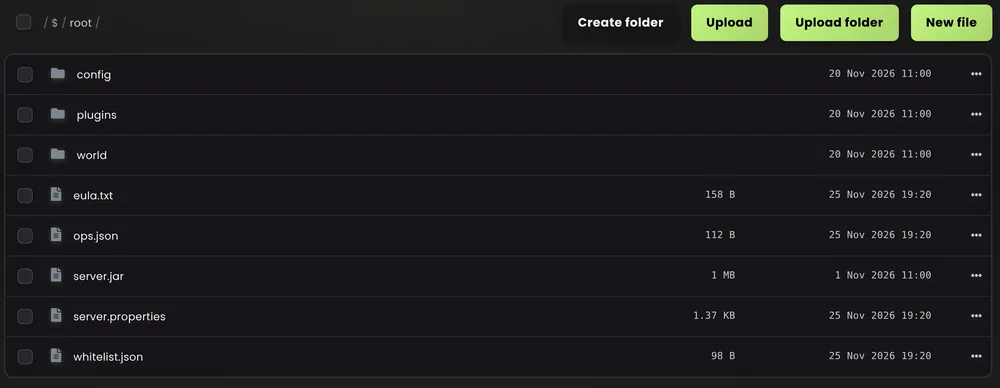
- Go to the Files tab and click
server.properties. - Find the line
online-mode=trueand change it to:
online-mode=false- Click Save content in the bottom right corner.
- Start the server with Start.
From now on anyone who knows the address can join, whether they own the game or not.
Protect accounts with a password
The most popular login plugins are AuthMeReloaded (AuthMe setup) and nLogin. After installing one, each player sets a password with /register the first time they join, and later logs in with /login. Until they log in, they cannot move or chat.
These plugins run on Paper, Purpur and Spigot. You can change the software in the Server software tab and add plugins in the Plugins tab (how to install plugins).
Skins on an offline mode server
Players on an offline mode server often end up with the default Steve and Alex skins. To fix that, install the SkinsRestorer plugin. It looks up skins by player name, and players can also set their own with /skin.
How to switch back to online mode
Do the same steps, but set online-mode=true. Keep in mind that players get a different UUID after switching. Their inventory, OP and position may look as if they joined for the first time.
Frequently asked questions
Is an offline mode server legal?
Running a server in offline mode is not illegal in itself. Players who play without buying the game do break the Minecraft licence, though. Account security is also harder to guarantee on such a server.
I changed online-mode and players still cannot join.
Most likely the change was not saved, because the server was running and overwrote the file when it stopped. Stop the server, change the line again, save it and only then start the server.
My server is behind BungeeCord or Velocity. Where do I turn off online-mode?
On the proxy (BungeeCord or Velocity) you set online mode in the proxy's own config, and on the servers behind it you keep online-mode=false. The details depend on your proxy setup.
Can players who own the game still join?
Yes. With online-mode off, everyone can join, with or without a paid account.