 Pepe
How to restore a Minecraft server backup
You can restore a backup in full, or take only what you need from it, such as one world or a config file.
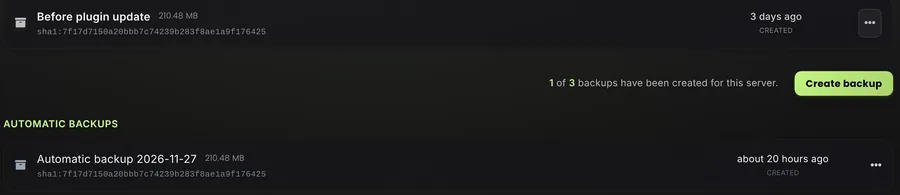
Automatic backups are made every day on a separate server and do not use your plan's disk space. In the panel you can restore an automatic backup from the last 24 hours. Older states can only be recovered from backups you made yourself.
The whole server
- In the Backups tab click the three dots next to the backup.
- Choose Restore and confirm.
All files go back to the state from the backup. Everything that changed afterwards is gone, including player progress.
Only one world or file
- Click the three dots next to the backup and Download it to your computer.
- Unpack the archive and find the folder or file you need, for example
world_netherorplugins/LuckPerms/config.yml. - Stop the server.
- Upload that folder or file in the Files tab or with SFTP, replacing the current one.
- Start the server.
Big folders are easier to upload as a .zip archive and unpack in the panel, the same way as when you upload a world.
Frequently asked questions
Someone destroyed a base. Do I have to roll back the whole world?
No. With CoreProtect you can undo only that player's changes.
I need the state from 3 days ago, but the automatic backup is from yesterday.
The panel offers the automatic backup from the last 24 hours. An older state can only come from a backup you made yourself, which is why you should make one before every bigger change.
I restored a backup and nothing changed.
Check that you picked the backup with the right date. Restart the server after restoring.